We have compiled a list of manufacturers, distributors, product information, reference prices, and rankings for 3D design support software.
ipros is IPROS GMS IPROS One of the largest technical database sites in Japan that collects information on.

3D design support software Product List and Ranking from 4 Manufacturers, Suppliers and Companies | IPROS GMS

3D design support software Product List

1~7 item / All 7 items

Displayed results

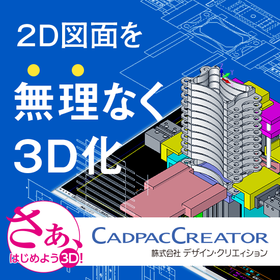
Realizing 'effortless 3D conversion' by leveraging the strengths of each aspect of 2D and 3D CAD.

Create a 3D model from the conceptual diagram of 2DCAD. Editing and modifications can be intuitively operated with direct modeling using 'CADPAC-CREATOR'.

"Can we smoothly transition from 2D design to 3D design? What changes will occur once we incorporate 3D design?" There may be 2D CAD designers who are pondering these questions. With CADPAC-CREATOR, instead of jumping straight into 3D design, we first create the necessary 3D models using 2D conceptual drawings, and then we conduct detailed design within the 3D environment. CADPAC-CREATOR enables a "natural transition to 3D" that leverages the strengths of both 2D and 3D. ▼Benefits of Introducing CADPAC-CREATOR▼ - Intuitive 3D modeling with a 2D mindset - Prevention of simple mistakes that occurred in 2D - What is difficult in 2D becomes easy in 3D - Effective use of both 2D and 3D to improve design quality

  • iprosメルマガ2311_02.png
  • iprosメルマガ2311_03.png
  • 3D CAD
  • 2D CAD machine
  • Other CAD
  • 3D design support software

Added to bookmarks

Bookmarks list

Bookmark has been removed

Bookmarks list

You can't add any more bookmarks

By registering as a member, you can increase the number of bookmarks you can save and organize them with labels.

Free membership registration

CATIA 3DMaster Designer (M3D)

A single 3D product definition ensures consistency between 3D design and 2D tolerances and annotation information.

CATIA 3DMaster Designer (M3D) enables direct design definition on 3D models (also known as model-based definition), eliminating duplicate work through the generation, updating, and interpretation of 2D drawings. The Semantic Tolerancing Advisor guides designers to create consistent 3D definitions of products in compliance with standards such as ISO, ANSI/ASME, and JIS. Additionally, support is provided for master definitions to remain in 3D. Since specifications, tolerances, and annotations can be preserved in international 3D data exchange standards like STEP, 3DMaster Designer can create product and manufacturing information 100% in 3D.

  • Engine parts
  • Vehicle body parts
  • Brake parts
  • 3D design support software

Added to bookmarks

Bookmarks list

Bookmark has been removed

Bookmarks list

You can't add any more bookmarks

By registering as a member, you can increase the number of bookmarks you can save and organize them with labels.

Free membership registration

Design Review DX "Issues"

Realizing front-loading through design review DX

Anyone can open a 3D model with one click from any PC at any time, directly annotate in 3D during their free time, and collect tasks without missing anything!

  • Company:Scene
  • Price:Other
  • 3D CAD
  • 3D design support software

Added to bookmarks

Bookmarks list

Bookmark has been removed

Bookmarks list

You can't add any more bookmarks

By registering as a member, you can increase the number of bookmarks you can save and organize them with labels.

Free membership registration

Connecting from design to post-processing with 3D technology - Orizuru 3D

A perspective that reconnects information divided by projects to enhance the speed of decision-making and reproducibility.

It is considered important to connect design, verification, and manufacturing using 3D technology to reduce rework and waste. However, in reality, there are many companies where the information generated during the design phase is not sufficiently utilized in the subsequent processes, leading to confirmations and reinterpretations at each stage. When information is interrupted between design, estimation, procurement, and manufacturing, it becomes easy to have back-and-forth movements to previous stages with each decision. If the same content is repeatedly confirmed, it tends to undermine not only the speed of response but also the reproducibility of decisions. 'Orizuru 3D' is a product that addresses these challenges by connecting operations across estimation, design, procurement, and manufacturing process design using 3D/AI technology. It accelerates estimation decisions through rule-based cost estimation and price prediction using machine learning, and facilitates confirmation among stakeholders with lightweight 3D displays. 【Features】 ■ Automatic estimation ■ Lightweight 3D rendering in a web browser *For more details, please download and view the PDF. 【Reference Article】 What is Digital Engineering? Explaining the Key Points for Implementation https://www.cct-inc.co.jp/koto-online/archives/71

  • Other Software
  • 3D design support software

Added to bookmarks

Bookmarks list

Bookmark has been removed

Bookmarks list

You can't add any more bookmarks

By registering as a member, you can increase the number of bookmarks you can save and organize them with labels.

Free membership registration

Beyond CAD, connecting data - Orizuru 3D

Don't just finish with design. Move the CAD data to the next stage.

How to directly link design data to processing and manufacturing preparation. This is an important theme in improving productivity and preventing rework. If 3D data can be smoothly transferred to subsequent processes, it can reduce verification work and expedite estimates and manufacturing preparations. However, the situation on the ground is not that simple. Even if 3D modeling is progressing in the design department, the manufacturing side still faces issues with interpreting drawings and individual confirmations, leading to a disconnect in information. When this gap occurs between design and manufacturing, it results in repeated confirmations of the same shape, leading to variations in judgment and delays in response. The solution to this design-manufacturing gap is 'Orizuru 3D.' Through shape recognition, similarity searches, automatic estimates, and lightweight 3D displays, it expands design data into procurement and manufacturing preparation, accelerates on-site decision-making, and supports the creation of workflows that are less reliant on individual expertise. 【Features】 ■ Automatic estimation ■ Lightweight 3D rendering in a web browser *For more details, please download the PDF. ■ Reference Article What is CAM/CAD? Explaining the differences from CAE and how it is utilized in manufacturing https://www.cct-inc.co.jp/koto-online/archives/330

  • Other Software
  • 3D design support software

Added to bookmarks

Bookmarks list

Bookmark has been removed

Bookmarks list

You can't add any more bookmarks

By registering as a member, you can increase the number of bookmarks you can save and organize them with labels.

Free membership registration

Based on the model, not the drawing (Orizuru 3D)

Don't just finish by drawing. Move the model to the next stage.

The concept of advancing manufacturing based on digital models such as 3D is important for sharing design information more accurately and using it consistently through to later processes. In operations centered around drawings, there are often situations where communication and reinterpretation are cumbersome, but by focusing on models, it becomes easier to minimize discrepancies in information. However, in practice, even when models are created, actual operations may revert to drawings or individual confirmations. As a result, information held during design can be lost midway through the process, often leading to re-checking and inconsistencies in judgment. The tool that aims to establish this model-centric approach in practice is 'Orizuru 3D'. Through shape recognition, automatic estimation, and lightweight 3D visualization, it expands design data into estimation, procurement, and manufacturing process design, making models easier to use in subsequent processes. 【Features】 ■ Automatic estimation ■ Lightweight 3D rendering in a web browser *For more details, please download the PDF. ■ Reference Article How does manufacturing change with MBE (Detailed Design)? Features of Model-Based Development https://www.cct-inc.co.jp/koto-online/archives/76

  • Other Software
  • 3D design support software

Added to bookmarks

Bookmarks list

Bookmark has been removed

Bookmarks list

You can't add any more bookmarks

By registering as a member, you can increase the number of bookmarks you can save and organize them with labels.

Free membership registration

Proceeding with the model, advancing development ahead of schedule <Orizuru 3D>

Find it with the model before trying to fix it.

The concept of using models to advance design and verification from the early stages of development directly leads to a reduction in the number of prototypes and an increase in development speed. If more decisions can be made upstream, it becomes easier to minimize the burden of corrections and confirmations in later processes. However, on-site, the information obtained from models is often not fully utilized in later processes, and issues frequently surface during the prototyping and adjustment stages. If challenges that should have been identified early on get buried along the way, the rework required later increases significantly. 'Orizuru 3D' connects these early decisions to practical applications. Through shape recognition, automatic estimation, and lightweight 3D visualization, it expands design data into estimation, procurement, and manufacturing process design, making it easier to use the information obtained upstream in the next processes. 【Features】 ■ Automatic estimation ■ Lightweight 3D rendering in a web browser *For more details, please download and view the PDF. ■ Reference Article What is Model-Based Development (MBD)? A thorough explanation of its benefits and case studies https://www.cct-inc.co.jp/koto-online/archives/31

  • Other Software
  • 3D design support software

Added to bookmarks

Bookmarks list

Bookmark has been removed

Bookmarks list

You can't add any more bookmarks

By registering as a member, you can increase the number of bookmarks you can save and organize them with labels.

Free membership registration